
666H Register & Create Your Account for a Free 500 Bonus
Creating a new 666H Register account is usually simple if you have the required information ready. New users should first understand the registration form and check each field before submitting their details. Depending on the current registration system, users may need to provide basic account information and complete an OTP verification step.
What You Need Before Creating a 666H Account
It is helpful to have a few basic things ready. Having these details ready can make signup easier and reduce common mistakes.
Active Contact Details
Keep an active phone number or supported contact method available before beginning registration. You may need access to it if the account setup includes an OTP or another verification step. Make sure the information you enter matches the details requested on the current registration form.
Secure Password
Create a password that is difficult for others to guess. Avoid using simple combinations such as your name, birthday, or repeated numbers. A unique password is also better than reusing the same password you use for email or other important accounts. Keep your password private and do not send it to anyone.
Accurate Information
Read each registration field carefully and provide the information requested by the current form. Check your entries before submitting the account request, especially phone numbers, usernames, and other required details. Correct information can help avoid unnecessary registration or verification problems later.
Complete Guide to Setting Up Your 666H Account
Open the Sign-Up Form
- Visit the current 666H access page.
- Check the website address carefully.
- Find the Register button.
- Select the sign-up option.
- Wait for the registration form to load.
- Read the instructions shown on the page.
- Enter the requested details correctly.
- Review the form before submitting.
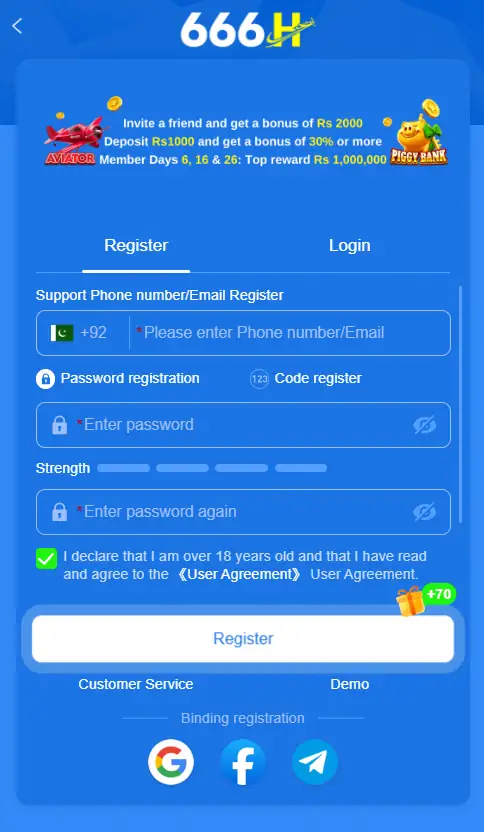
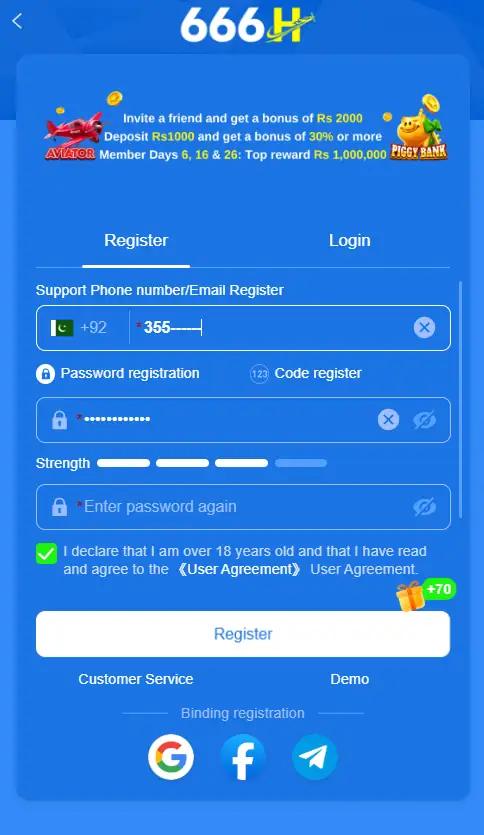
Begin the Registration Form 6666H
- Start by opening the current 666H registration page and selecting the signup option.
- Enter the details requested in each field carefully.
- Use active contact information if verification is required.
- Create a secure password and avoid using an easy-to-guess combination.
- Before submitting, check the form for missing fields or typing mistakes.
- Reading the instructions beside each field can help you enter the information in the correct format.
- Once everything looks accurate, submit the registration form and continue with any verification step shown on the page.
Verify Your Account With OTP
- Check your registered phone or contact method.
- Wait for the OTP message to arrive.
- Enter the latest OTP in the verification field.
- Check each digit before submitting.
- Use the newest code if multiple OTPs arrive.
- If the code expires, request another one.
- Never share your OTP with anyone.
- Continue once the verification is successfully completed.